
Learn how to integrate Excel files into SEI or SQL databases, using ODBC technology to combine Excel data with ERP...
Latest posts
-
 Integrating Excel Files into SEI and SQL for Global Reporting via ODBCRead more
 -
 VAT Simulation Before Invoice Generation in Sage X3Read more
Learn how to simulate VAT in Sage X3 before generating an invoice, enabling accurate financial forecasts that include...
-
 Optimizing Imports in Sage X3 with Multithread Batch ProcessingRead more
Learn how to optimize imports in Sage X3 with multithread batch processing by parallelizing tasks to reduce execution...
-
 Document Download in Sage X3 Using 4GL LanguageRead more
Explore a method for Sage X3 developers to enhance user experience by simplifying document downloads from the server...
-
 In-Depth Exploration of the New Container Management Feature in Sage X3Read more
Discover the revolutionary Container Management feature in Sage X3. Enhance operational efficiency and traceability...
-
 EXEC_JS / streamline.js / Sage X3 Syracuse Javascript bundlesRead more
Sage X3: Overcoming Limitations with the Bridge between 4GL and JavaScript Sage X3 4GL can sometimes encounter...
-
 Capturing Detailed Errors After a Silent Import in Sage X3Read more
Discover how to effectively capture detailed errors after performing a silent import in Sage X3. Learn methods to...
-
 How to connect an external database in Sage Enterprise Intelligence with an identifier containing a dot ?Read more
Learn how to address issues with special characters in database identifiers when using Sage Enterprise Intelligence....
-
 Exploring the ATEXTRA Table for Storing Translated Text in ApplicationsRead more
Dive into the ATEXTRA table, a crucial tool for storing translated text within applications. Discover how it manages...
-
 Troubleshooting Sage X3 Folder Validation ErrorsRead more
Learn about common validation errors when creating or importing folders in Sage X3 and how to resolve them.
Blog categories
Search in blog
The Impact of Cloud Computing on Sage X3 Debugger Tools
The Impact of Cloud Computing on Sage X3 Debugger Tools
Cloud computing has introduced significant changes in the landscape of Sage X3 debugger tools.
Challenges for Sage X3 Consultants
Sage X3 consultants often face challenges when attempting to establish a debug connection between Eclipse and Sage X3.
These challenges can be attributed to the complexity of network configurations. If you're encountering difficulties related to "infbox" in your code, read on to understand the context and find a workaround.
Before Cloud Computing:
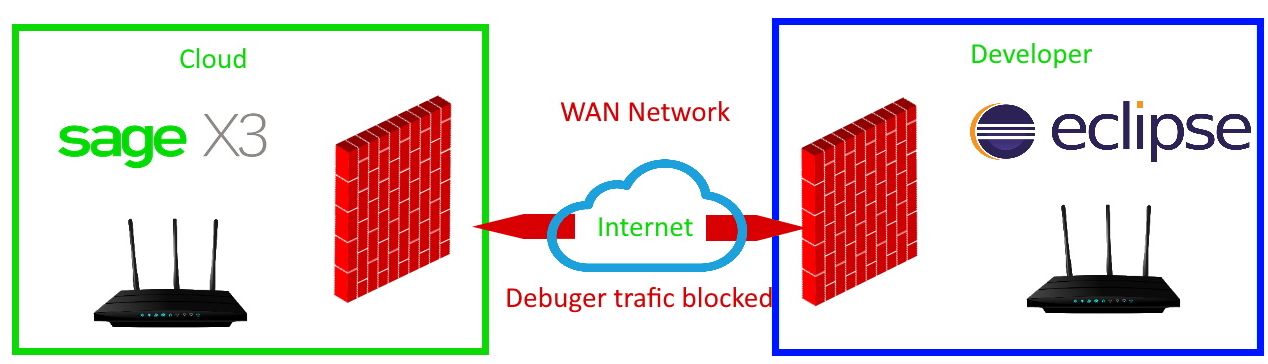
Prior to the cloud era, both Eclipse and Sage X3 resided on the same network, allowing seamless communication between them.

Challenges with Cloud Computing:
In the present day, cloud computing involves two distinct networks connected through a VPN and enhanced security measures that can restrict access to the debug port.
Steps to Overcome the Challenges:
1) Resolve Network Issues:
Ensure that firewalls on both ends allow communication through TCP port 10000 (or your chosen debugger port). Test the connection using the command: Telnet [IP] [Port]
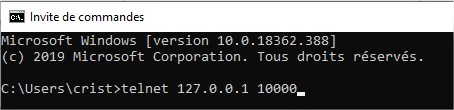
If successful, you'll see a blank screen; otherwise, an error message will appear.
2) Configure Sage X3 for Debugging:
If you have a static IP, set up debugger parameters directly in Sage X3. For dynamic IPs, no Sage X3 configuration is needed. Setup can be done at various levels: Folder, Legislation, or User. Enter your IP in Sage X3 under Parameter Definitions.
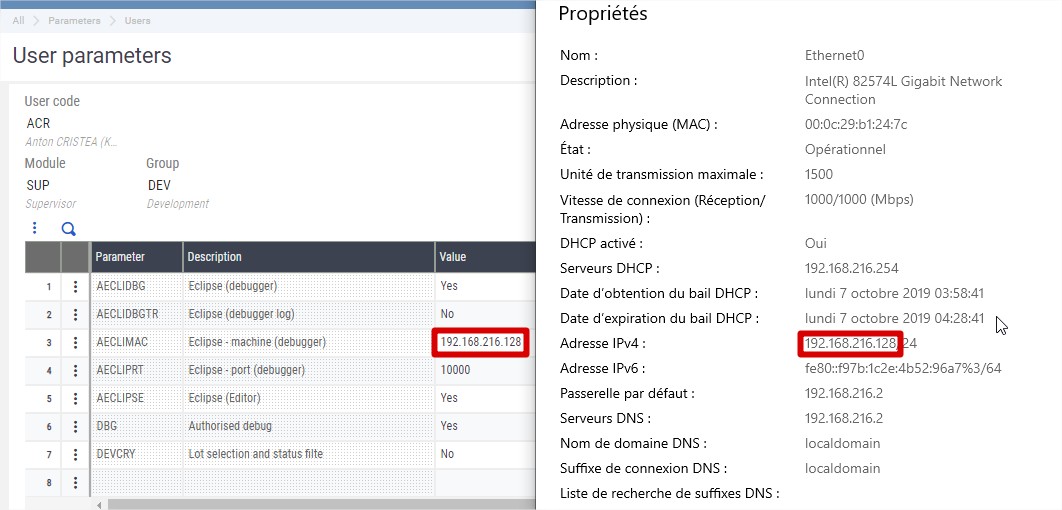
3) Eclipse Configuration:
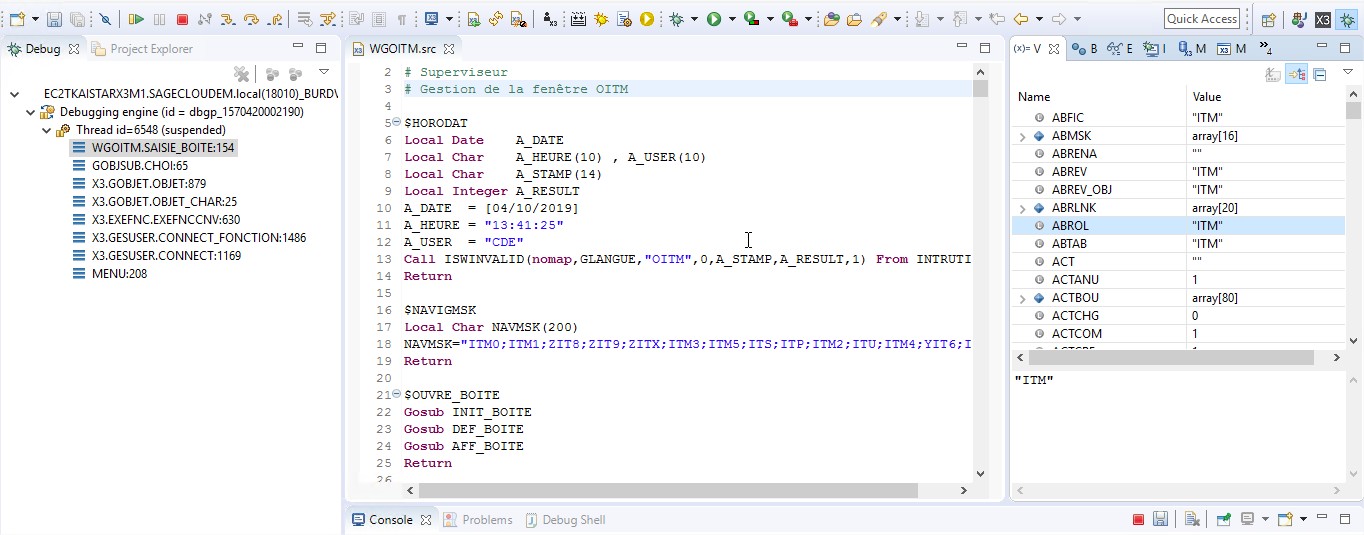
If Sage X3 parameters are set correctly, Eclipse will automatically fetch this data. Click the icon to verify communication between Sage and Eclipse.
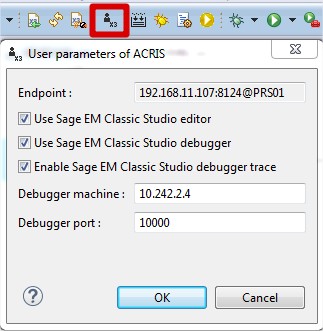
4) Binding Eclipse with Sage X3:
Bind specific Sage X3 web sessions to Eclipse. Select the session and attach.
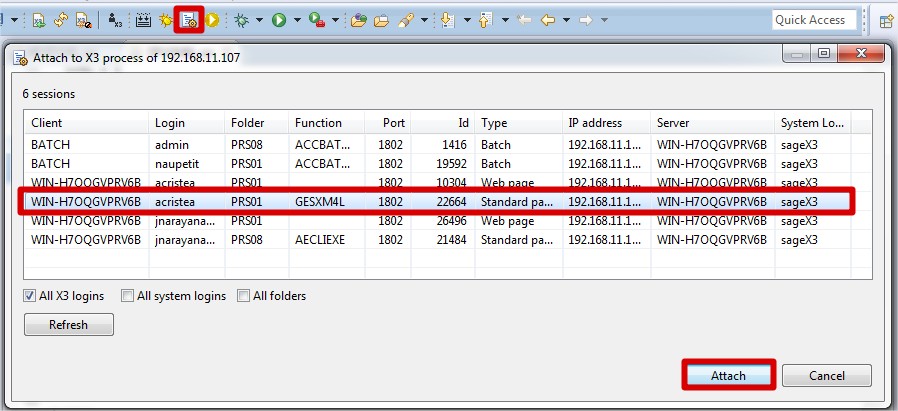
5) Debugging with Sage X3 through Eclipse:
Switch between Sage X3 actions and Eclipse to proceed with debugging. Sage X3 will pause due to breakpoints set in Eclipse.
Related posts
-
 Troubleshooting Sage X3 SVG Folder Configuration
Learn how to resolve issues with Sage X3 SVG folder configuration, including creating symbolic links using mklink...Read more
Troubleshooting Sage X3 SVG Folder Configuration
Learn how to resolve issues with Sage X3 SVG folder configuration, including creating symbolic links using mklink...Read more -
 Exploiting Software Security Vulnerabilities in Sage X3
Learn about a non-standard approach to exploiting a security breach in Sage X3 software.Read more
Exploiting Software Security Vulnerabilities in Sage X3
Learn about a non-standard approach to exploiting a security breach in Sage X3 software.Read more -
Troubleshooting Sage X3 Folder Validation Errors
Learn about common validation errors when creating or importing folders in Sage X3 and how to resolve them.Read more
-
Exploring the ATEXTRA Table for Storing Translated Text in Applications
Dive into the ATEXTRA table, a crucial tool for storing translated text within applications. Discover how it manages...Read more
-
Capturing Detailed Errors After a Silent Import in Sage X3
Discover how to effectively capture detailed errors after performing a silent import in Sage X3. Learn methods to...Read more
Leave a comment