
Learn how to integrate Excel files into SEI or SQL databases, using ODBC technology to combine Excel data with ERP...
Latest posts
-
 Integrating Excel Files into SEI and SQL for Global Reporting via ODBCRead more
 -
 VAT Simulation Before Invoice Generation in Sage X3Read more
Learn how to simulate VAT in Sage X3 before generating an invoice, enabling accurate financial forecasts that include...
-
 Optimizing Imports in Sage X3 with Multithread Batch ProcessingRead more
Learn how to optimize imports in Sage X3 with multithread batch processing by parallelizing tasks to reduce execution...
-
 Document Download in Sage X3 Using 4GL LanguageRead more
Explore a method for Sage X3 developers to enhance user experience by simplifying document downloads from the server...
-
 In-Depth Exploration of the New Container Management Feature in Sage X3Read more
Discover the revolutionary Container Management feature in Sage X3. Enhance operational efficiency and traceability...
-
 EXEC_JS / streamline.js / Sage X3 Syracuse Javascript bundlesRead more
Sage X3: Overcoming Limitations with the Bridge between 4GL and JavaScript Sage X3 4GL can sometimes encounter...
-
 Capturing Detailed Errors After a Silent Import in Sage X3Read more
Discover how to effectively capture detailed errors after performing a silent import in Sage X3. Learn methods to...
-
 How to connect an external database in Sage Enterprise Intelligence with an identifier containing a dot ?Read more
Learn how to address issues with special characters in database identifiers when using Sage Enterprise Intelligence....
-
 Exploring the ATEXTRA Table for Storing Translated Text in ApplicationsRead more
Dive into the ATEXTRA table, a crucial tool for storing translated text within applications. Discover how it manages...
-
 Troubleshooting Sage X3 Folder Validation ErrorsRead more
Learn about common validation errors when creating or importing folders in Sage X3 and how to resolve them.
Blog categories
Search in blog
Exploiting Software Security Vulnerabilities in Sage X3
This solution exposes a security vulnerability in the software and deviates from the standard approach.
Keep in mind that Sage X3 calls an external program named Crystal Report for generating reports.
The communication between these software components is not secure and could be exploited if accessed by partners or customers.
This operation should not be performed for external and untrusted resources.
Problem:
The management console encrypts the database password field, and recovering it might be challenging.
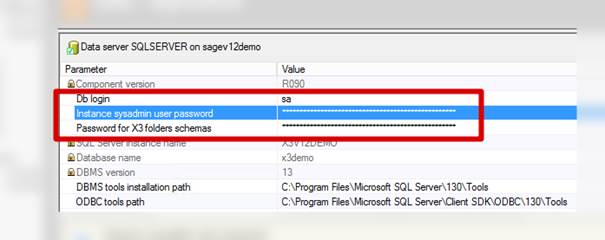
Pre-requisite:
- Access to Sage X3 folder with Eclipse or Script Editor is required.
- Setup AIMP3 Entry point.
Solution: AIMP3 Entry point code:
|
$ACTION Case ACTION When "PARAM": Gosub RECOVERY Endcase Return $RECOVERY For IT=1 To NBPAR If find(left$(PARAMETRE(IT), 12), "__DBPASSWORD"): Infobox PARAMETRE(IT) : Endif Next IT Return |
Afterward, printing anything with Sage X3 based on Crystal Report triggers a popup containing the database password for the SA login.

Related posts
-
 Troubleshooting Sage X3 SVG Folder Configuration
Learn how to resolve issues with Sage X3 SVG folder configuration, including creating symbolic links using mklink...Read more
Troubleshooting Sage X3 SVG Folder Configuration
Learn how to resolve issues with Sage X3 SVG folder configuration, including creating symbolic links using mklink...Read more -
 The Impact of Cloud Computing on Sage X3 Debugger Tools
Explore the significant changes in Sage X3 debugger tools brought about by cloud computing and the challenges faced...Read more
The Impact of Cloud Computing on Sage X3 Debugger Tools
Explore the significant changes in Sage X3 debugger tools brought about by cloud computing and the challenges faced...Read more -
Troubleshooting Sage X3 Folder Validation Errors
Learn about common validation errors when creating or importing folders in Sage X3 and how to resolve them.Read more
-
Exploring the ATEXTRA Table for Storing Translated Text in Applications
Dive into the ATEXTRA table, a crucial tool for storing translated text within applications. Discover how it manages...Read more
-
Capturing Detailed Errors After a Silent Import in Sage X3
Discover how to effectively capture detailed errors after performing a silent import in Sage X3. Learn methods to...Read more
Leave a comment